The problem
Paper to a clean PDF, from the camera.
Portfolio · Utility

Paper to a clean PDF, from the camera.
Pravinaben Makadiya


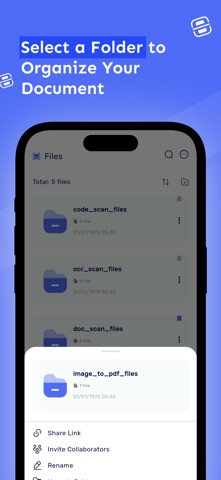
Real store product · open the listing before we talk
Product proof
Real product details and unedited screens from the public store listing.
Inside the product
07 store screens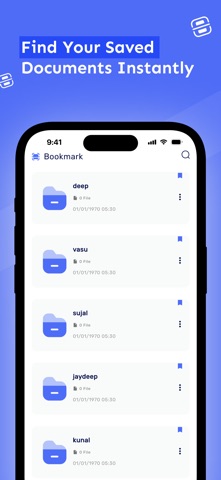


From the App Store
Document Scanner - PDF Creator, Scanner app is a powerful and easy-to-use tool that allows you to scan, convert, and share documents on the go.
Whether you're scanning receipts, business cards, notes, or multi-page documents, this app offers high-quality results in just a few taps.
With its fast and efficient features, you can quickly create and save PDFs, JPGs, or other image formats, all directly from your phone or tablet. Key Features: High-Quality Scanning: Scan documents in high resolution, ensuring clear and legible PDFs or images.
Automatic Edge Detection: The app automatically detects the edges of documents, cropping them perfectly and ensuring a clean scan every time. Multiple Page Scanning: Scan multipage documents and combine them into a single PDF for easy sharing and archiving.
OCR (Optical Character Recognition): Extract text from scanned documents and images, making them editable and searchable. Copy, edit, or translate text right from the scan.
Create PDFs or JPGs: Save your scans as high-quality PDFs or JPGs, ready for sharing, printing, or storing digitally. Document Scanner - PDF Creator, Scanner now and turn your phone into a powerful document scanning tool!
About this app
Document Scanner is a utility app made for people who want a quick, simple tool on their phone. A document scanner that turns paper into high-quality PDFs using a phone camera.
It is built with Flutter, Camera and ships on iOS · Android.
The problem
Paper to a clean PDF, from the camera.
The solution
A document scanner that turns paper into high-quality PDFs using a phone camera.
Key features
Paper to a clean PDF, from the camera.
iOS · Android
Flutter, Camera
Want something similar?
Pick what you need. We start with a small first version, then add more once people use it.
People finish the task in a few taps.
Use the camera, the microphone and files, even with a weak signal.
Add translation, scanning or smart suggestions where they help.
A free start and a paid upgrade, set up on both stores.
See what breaks and what people use most.
Apps like this I can build
Questions
Yes. I can build a utility app with a similar feel and quality, with your own features and brand. Tell me what you want and I will suggest a first version.
Yes. I build with Flutter, so you get both apps from one codebase. That keeps cost and upkeep lower.
A simple first version often takes 4 to 10 weeks, depending on the features. After a short chat I send a clear plan, a timeline and a price in USD.
Yes. Use the store buttons on this page to open Document Scanner and tap through it before we talk.
More in Utility
Like Doc Scanner : scan to pdf? Want to build something like it?
The quickest way is a WhatsApp message. I usually reply within one business day.
Keep exploring
Next step
Send the job. I will say if I am the right builder, and quote in USD.
